
Raup Coiler II
This site is dedicated to the Raup Coiler II software. This its content:
Introduction
Features
Raup model
User guide
License
Download
Introduction
Features
Raup model
User guide
License
Download
Introduction
Raup Coiler II is, a Windows application designed to simulate, render, and analyze the three-dimensional geometry of biological coiled shells in real time. Based on the seminal mathematical model developed by paleontologist David M. Raup, the software allows users to dynamically adjust morphological parameters and immediately observe and study how these values shape the shell geometry.
The project began in the mid-1990s as a personal development in QuickBASIC (and later Visual Basic) after discovering Raup's model during university paleontology coursework. I named it Raups Coiler and made it available in my website. Over the years, Raups Coiler became a popular educational tool worldwide. Raup Coiler II is a complete modern revision of the original program that introduces real-time 3D graphics libraries, with a fully resizable viewport, flexible rendering modes, and 3D printing export capabilities.
The program has been designed primarily for educational and scientific contexts, Raup Coiler II is aimed at students, educators, and researchers in paleontology, evolutionary biology, and functional morphology, as well as 3D design enthusiasts interested in generative biological modeling.
The project began in the mid-1990s as a personal development in QuickBASIC (and later Visual Basic) after discovering Raup's model during university paleontology coursework. I named it Raups Coiler and made it available in my website. Over the years, Raups Coiler became a popular educational tool worldwide. Raup Coiler II is a complete modern revision of the original program that introduces real-time 3D graphics libraries, with a fully resizable viewport, flexible rendering modes, and 3D printing export capabilities.
The program has been designed primarily for educational and scientific contexts, Raup Coiler II is aimed at students, educators, and researchers in paleontology, evolutionary biology, and functional morphology, as well as 3D design enthusiasts interested in generative biological modeling.
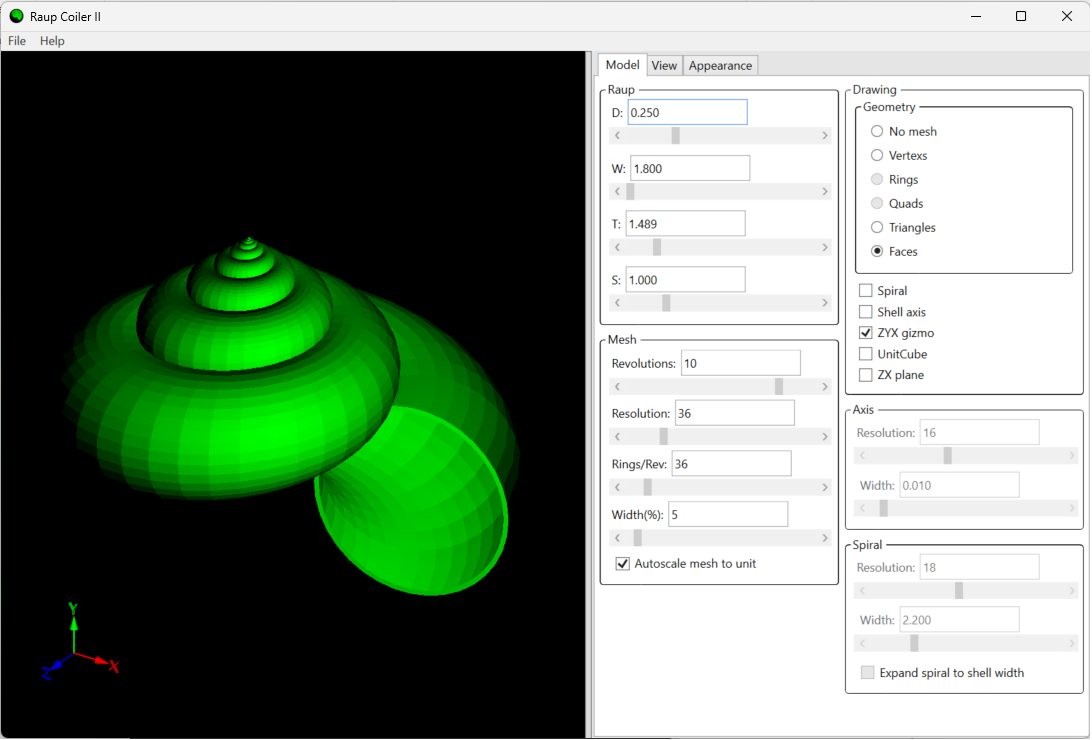
RaupCoilerII main interface
Features
These are the most relevant features of the RaupCoilerII software:
- Live shell generation: it allows you to modify the Raup Model parameters W, D, T and S and see the result in real time.
- Mesh controls: other mesh parameters can also be configured to adjust the way the shell is generated: number of revolutions, resolution of the generating curve, rings per revolution, shell wall thickness...
- Render styles: different render modes to view the model are available: only vertices, triangles (wireframe), shaded faces, no mesh...
- Helper geometry: helper geometry that can be turned on or off to help analyze the resulting shell model: coiling axis, spiral traced by the aperture, XYZ gizmo, unitary cube, ZX plane.
- Full orientation control: the application allows to view the resulting 3D shell model in different orientations using orthographic or perspective projection. The light position can be adjusted through its spherical coordinates. (θ zenith, φ azimuth, r distance), and the light can also be configured to follow the camera.
- Appearance: different options to set the colour, transparency and other details of the shell are available.
- Save and Load: the full set of parameters can be stored as a JSON
.riifile. - Export: export the shell mesh to
.stlor.objto use it in other modelling software or to print it on a 3D printer.
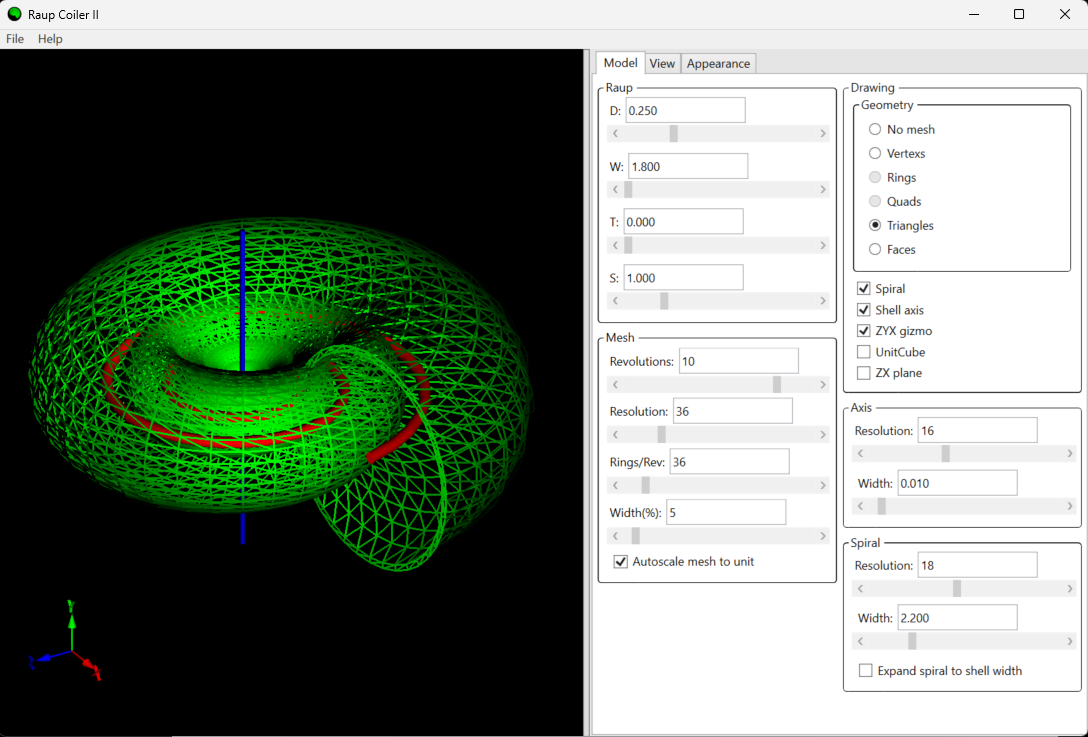
Render in triangles mode with the spiral and shell coiling axis enabled.
About the Raup model
User guide
RaupCoilerII project license
Unless otherwise stated by the copyright holder, the software design, and any other content of the RaupCoilerII project is distributed under by-nc-sa 4.0 license . You can use any information related to this software as you want while you follow the by-nc-sa 4.0 license conditions.
Limitation of Liability: In no event and under no legal theory, whether in tort (including negligence), contract, or otherwise, unless required by applicable law (such as deliberate and grossly negligent acts) or agreed to in writing, shall the author be liable for any damages, including any direct, indirect, special, incidental, or consequential damages of any character arising as a result of this License or out of the use or inability to use the software (including but not limited to damages for loss of goodwill, work stoppage, computer failure or malfunction, or any and all other commercial damages or losses), even if the author has been advised of the possibility of such damages.
Limitation of Liability: In no event and under no legal theory, whether in tort (including negligence), contract, or otherwise, unless required by applicable law (such as deliberate and grossly negligent acts) or agreed to in writing, shall the author be liable for any damages, including any direct, indirect, special, incidental, or consequential damages of any character arising as a result of this License or out of the use or inability to use the software (including but not limited to damages for loss of goodwill, work stoppage, computer failure or malfunction, or any and all other commercial damages or losses), even if the author has been advised of the possibility of such damages.
RaupCoilerII download
RaupCoilerII was developed in C# and Windows Presentation Foundation using Microsoft Visual Studio Community 2022 (v 17.7.0). It is available as a portable executable or as an installer, and it can also be downloaded as a Visual Studio project from its GitHub repository. The source code of the RaupCoilerII can be found on the following GiHub repository: github.com/synthkore/raupcoilerii.git.
To run the RaupCoilerII software, you'll need a personal computer with Windows 10 or later and the .NET 7.0 runtime or above installed. It is available as a:
- Portable program: unzip de content of the provided file with the binaries into a folder with user write permissions and then execute RaupCoilerII.exe. The application will not run if .NET 7.0 Framework is not installed in the computer.
- Installable: unzip de content of the provided file with the installer and execute the file with .MSI extension.
Latest version: vx.x.x:
Here you can download the latest version vx.x.x. Downloading the software implies accepting the project license:
RaupCoilerIIEd 1.0.5 installer.
RaupCoilerIIEd 1.0.5 portable.
- Portable program: unzip de content of the provided file with the binaries into a folder with user write permissions and then execute RaupCoilerII.exe. The application will not run if .NET 7.0 Framework is not installed in the computer.
- Installable: unzip de content of the provided file with the installer and execute the file with .MSI extension.
Latest version: vx.x.x:
Here you can download the latest version vx.x.x. Downloading the software implies accepting the project license:
RaupCoilerIIEd 1.0.5 installer.
RaupCoilerIIEd 1.0.5 portable.
Contact
You can contact me here.

